TINYFRAME
If you're looking for a nerdy anniversary gift, you're in the right place!
Inspired by Alex's tinyboard collection around our house, I built TinyFrame: a Harry Potter-esque picture frame that turns photos into short black-and-white clips. It now lives on our fridge.
How it works
The hardware
The display is an Elecrow CrowPanel ESP32 4.2" e-ink panel. E-ink works by using a positive or negative charge to push ink to the front or back of each pixel, making it black or white. Once the charge is removed, the ink stays put. That's why e-ink makes such an efficient picture frame: once a picture is drawn, it stays there without using any power.
Because the ink has to physically move, there's a limit on how fast you can flash each frame of a video: a pixel needs a full waveform to settle completely black or white. One solution is to cut each waveform short, at around 100ms. This comes with a debt that has to be paid: each cut frame leaves a little charge behind (the cut skips the panel's normal cleaning steps), and minutes later a faint copy of the clip shows up under the resting picture. To fix this, the board tracks how far each pixel was pushed during playback. Before going to sleep when nobody is around, it pushes each pixel back the same amount, wipes the screen, and draws the final picture.
As a cherry on top, I added a motion sensor so the frame starts playing when someone walks into the kitchen.
The software
I wanted TinyFrame to have seamless UX and be controlled entirely from a phone. That creates a chicken-and-egg problem: out of the box, the frame has no internet. Luckily, the ESP32 can run its own Wi-Fi hotspot. You join it from your phone, and a captive portal pops up where you give it your home Wi-Fi password.
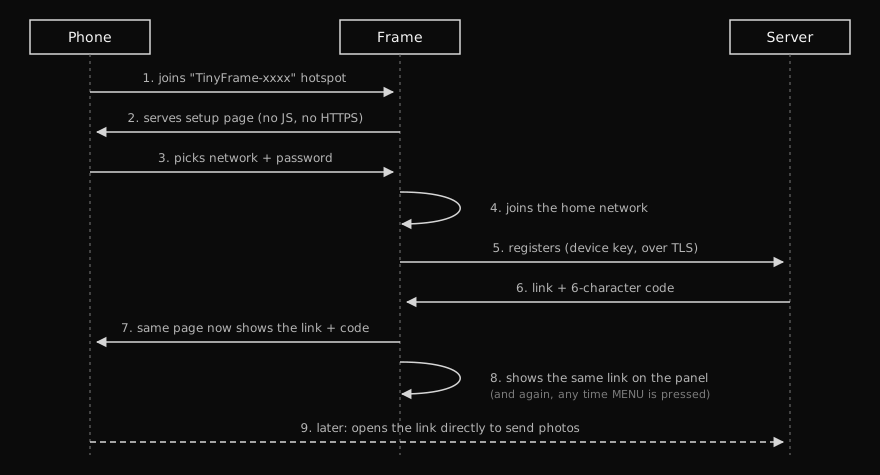
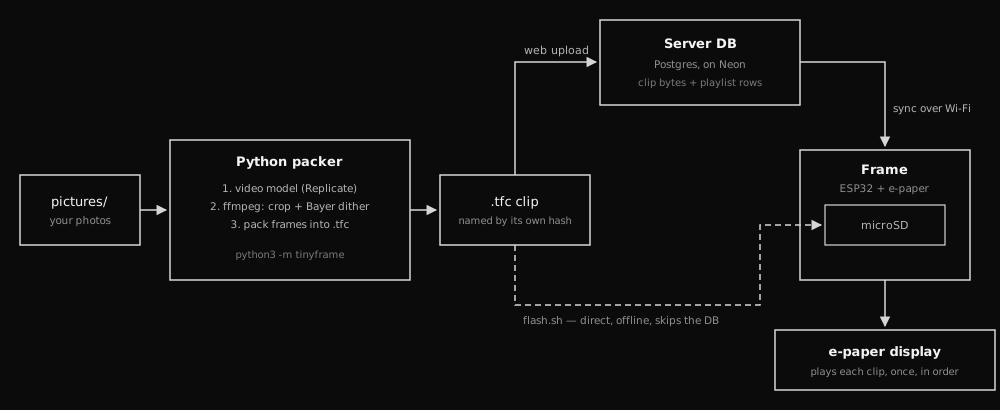
The frame then registers with the server and shows a QR code and a six-character pairing code. You (and your friends and family) can use either one to upload pictures. Once pictures are uploaded, Vercel Python functions call the Replicate API to turn each photo into a short video, dither it to black and white, and save it to a database. Each clip is just 24 frames, each a 400 x 300 grid of 0s and 1s, played at 8fps.
After each round of playback, the frame downloads new clips and saves them to its microSD card.
The case
Designing and printing the case took some trial and error, but Claude made it feel magical. It's two printed pieces in wood-colored filament, with magnets in the back to hold it on the fridge.
Before AI, building this project would've taken me months, and I probably wouldn't have even thought of it. With AI, it took a couple of weekends. What a time to be alive!